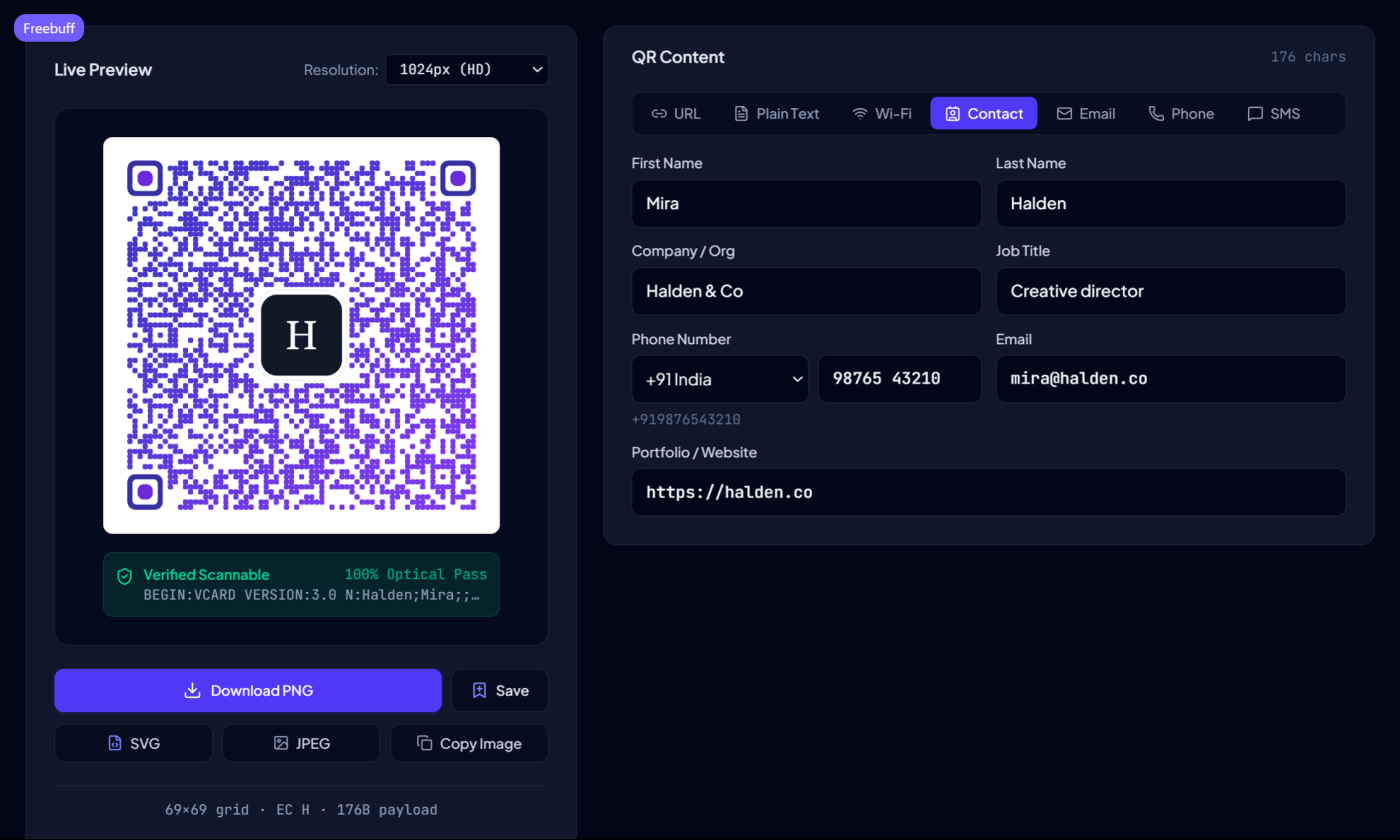
Short answer: a contact-card code carries a few hundred characters, which needs about 4 cm to print reliably. Most cards only have 1.5–2 cm to spare, so either give the code 4 cm or point it at a short URL instead of embedding the vCard.
The arithmetic that decides it
A standard card is 85 × 55 mm, and a comfortable design leaves a corner of roughly 20 × 20 mm for a code. A full vCard — name, company, title, phone, email, URL — runs to a few hundred characters, which needs around 45 modules across. Twenty millimetres divided by 45 is 0.44 mm per module, below the 0.5 mm floor where office printing starts to merge modules.
Strip the vCard to name and phone only and you can drop to a smaller grid, but then you have lost the point of a contact card. Push the code to 30–40 mm and it prints cleanly — which means redesigning the card around the code rather than adding it in the corner at the end.
vCard or URL?
These are two different products, and the choice matters more than the design:
- A vCard code contains the details themselves. It works offline, forever, with no hosting — but it is large, it cannot be updated, and it carries whatever it contained on the day it was printed.
- A URL code contains a short link to your contact page, portfolio or booking form. It scans easily at small sizes because the payload is tiny, and you can change what it points to — but it depends on the domain, and it costs the person one extra tap.
For a card that will be reprinted when you change roles, the URL is usually the better engineering choice. For a card you hand out at events and want to work without signal, the vCard is better. Some people print both: a small URL code on the front, a larger vCard on the back where there is more room.
Error correction is not free
Raising error correction makes a code more forgiving of damage, but it also packs more codewords into the same payload — so the symbol gets denser. On a card, where module size is the binding constraint, level H can push a code from "just prints" to "does not print".
The practical rule: use level H when there is a logo or the card will be handled hard, and level M or Q for a small, clean, logo-free code where module size matters more than damage tolerance. Test the actual printed card either way — that is the only measurement that counts.
Placement rules
- Corner, not centre. The three finder patterns must stay intact; a code dropped over a photograph or a coloured band loses contrast at the edges where detection starts.
- Keep the quiet zone. Do not bleed the code to the card's edge or crop its margin to fit a grid.
- No logo inside a 2 cm code. Below about 3 cm there is no room for a logo plate that does not cost modules.
- Dark on light. A white code on a black card looks striking and scans badly; if the card is dark, print the code on a white patch.
- Matte stock. Glossy cards reflect at exactly the angle someone holds them.
What happens when someone scans it
iOS shows a contact preview with a save button; Android offers "Add to contacts". Neither is instant — the person has to confirm — so a card code is not a replacement for having your name and number printed in text. Keep the human-readable details on the card and treat the code as a convenience.
Digital cards and signatures
The same code works in an email signature, on a slide, or on a conference badge, where there is no size constraint at all — those are the places a vCard code fits comfortably. If you maintain one code for everything, use the URL version so a job change does not invalidate a thousand printed cards.
Checklist
- Decide vCard or URL based on whether the details must be updatable.
- Give the code at least 30 mm if it carries a vCard.
- Check module size: printed width ÷ module count, and keep it above 0.5 mm.
- Keep the quiet zone and the finder patterns clear of other artwork.
- Dark modules on light; no logo below 3 cm.
- Order a proof: scan it at the size it will actually be read.
Build the contact code in the generator — the Contact tab formats and escapes the vCard — and see the vCard guide for what each field does. Sizing is covered in the print guide.