A "contact card" QR code is a plain-text vCard: the same format that gets
exported when you share a contact, wrapped in BEGIN:VCARD and
END:VCARD. Scanning it shows a contact preview with a "save"
button instead of opening a link.
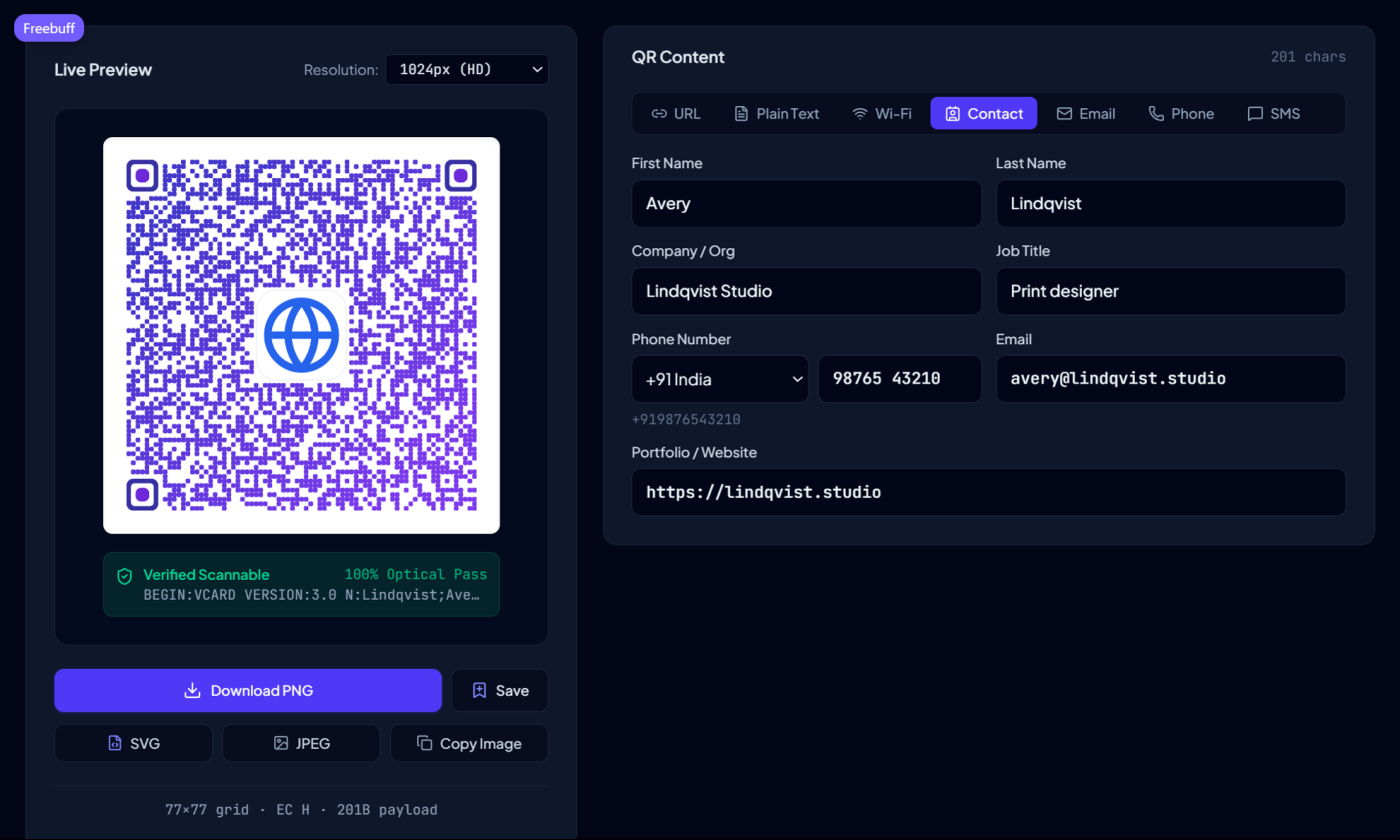
What is inside
BEGIN:VCARD
VERSION:3.0
N:Sharma;Priya;;;
FN:Priya Sharma
ORG:Northwind Studio
TITLE:Design Lead
TEL;TYPE=CELL:+919876543210
EMAIL:[email protected]
URL:https://example.com
ADR:;;12 Marine Drive;Mumbai;MH;400020;IN
END:VCARD
Version 3.0 is the pragmatic choice: it is what phone address books accept without argument. Version 4.0 exists and is stricter, but older Android contact handlers still treat it unevenly.
N and FN are both there for a reason
FN is the formatted name — the one a person reads, with the words
in the order their language uses. N is the structured name:
family name, given name, and three further components, separated by
semicolons. Address books sort by N and display FN,
so a card with only one of them behaves oddly: missing FN and the
contact appears as a reversed surname in some apps; missing N and
it sorts under the wrong letter.
Ordering conventions differ by country. Japanese, Chinese, Korean and Hungarian
names put the family name first, and a card generated with a Western
given-name-first assumption will sort incorrectly in those address books. The
generator does not try to guess: it maps the "first name" field to
N's second component and "last name" to the first, which is the
convention the format itself uses.
Escaping, again
vCard values are delimited by semicolons, so those delimiters inside a value must be escaped with a backslash — and so must commas, backslashes and line breaks:
\ ; , newline
A company named Studio; North has to become
Studio\; North. Skip that and the address book receives two
fields where you meant one. This is the single most common cause of a
contact card that "comes out wrong" after scanning.
Phone numbers and country codes
A number without a country code is ambiguous, and the ambiguity shows up weeks
later: the contact is saved, and calling it from abroad fails. Store numbers
in international form — + and the country code, no spaces — and
let the phone format them for display. The generator has a dial-code selector
that prefixes the number for you, and it drops a single leading trunk zero when
converting, so 09876… in India becomes
+919876… rather than +9109876….
The address is the weakest part
ADR formally has seven components: post office box, extended
address, street, locality, region, postal code and country. This generator
writes the whole address you type into the street component with the others
empty, which every phone will display as a single line — correct, but less
structured than a hand-written card. If you need per-field addresses (for CRM
imports, say), that is the one field to build by hand.
Contact codes are big, so print them big
A vCard with a name, company, phone, email and address is a few hundred characters, which pushes the symbol to roughly 45 modules — more than twice the grid of a short URL. Printed at 2 cm that leaves under 0.5 mm per module and the code stops resolving; at 4–5 cm it prints cleanly. This is the main reason business-card codes fail: the design slot is small and the payload is large.
The print guide has the module arithmetic, and trimming fields you do not need — a company URL nobody uses, a second phone number — is often the simplest way to make a card fit the space you have.
What phones actually do with it
iOS shows a contact card with a save button; Android opens a contact preview or offers "Add to contacts" depending on the version and the app that scanned it. In both cases the fields you see are the ones the scanner parsed, which is why a single unescaped semicolon produces visibly broken output rather than a failure.
Note that nothing is verified: a vCard cannot confirm the email or phone number is live. Treat it as a business card — a claim by the person who printed it.
Checklist
- Fill both name fields; check the preview shows the name the way you want it read.
- Phone in international form, dial code included.
- Escape
;,and\in company names and addresses. - Keep the payload lean — every optional field adds modules.
- Print at 4 cm or more, and test the printed card, not the screen.
- Logo, if any, inside the safe area — see the logo guide.
Build one in the generator — the Contact tab formats the vCard and escapes the fields for you. The scannability guide covers what else can go wrong, and the guides index lists the rest.